

Description
Quick Access Chrome Extensions
Overview
The software is a browser extension designed to streamline access to key Chrome features and tools. It serves users who frequently manage extensions, navigate developer dashboards, or access the Chrome Web Store. The tool simplifies workflows by centralizing essential links in one place, reducing the need to navigate multiple pages. It is particularly useful for developers, web designers, and power users who rely on Chrome’s ecosystem for daily tasks. The extension operates directly within the Chrome browser environment, integrating seamlessly with the user’s existing workflow. It does not require additional installations or system-level changes.
Real-world usage scenarios include managing active extensions, troubleshooting extension issues, or discovering new tools via the Chrome Web Store. The extension’s interface is minimal and focused, prioritizing speed and efficiency. Users can quickly access the option page to customize settings, including the ability to switch between different icons. The developer did not provide additional information about the origin or background of the project. However, the extension’s evolution, documented in the changelog, indicates ongoing improvements and responsiveness to user needs and platform updates.
Key Features & Capabilities
- Centralized Access to Chrome Tools – Provides one-click access to the Chrome Web Store, Developer Dashboard, Extensions window, and a popup with all three links. This reduces time spent navigating between pages.
- Customizable Icon System – Users can change the icon displayed in the browser toolbar, with updates applied dynamically upon configuration changes.
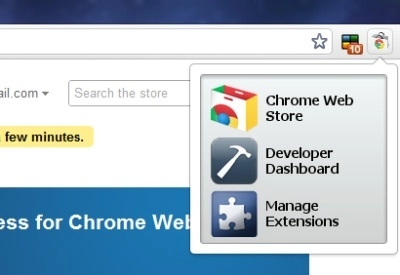
- Popup Interface – A dedicated popup window displays all three primary links, enhancing usability for users who prefer a visual menu.
- Multi-Language Support – Enables broader accessibility by supporting multiple languages, improving the experience for non-English speakers.
- Compliance with Branding Guidelines – Version 1.24 included updates to align with current platform branding standards, ensuring continued compatibility.
These features are especially beneficial when managing multiple extensions or troubleshooting browser-related issues. For example, a developer can quickly access the Developer Dashboard to upload a new extension or check performance metrics. A designer might use the Chrome Web Store to discover new tools for enhancing their workflow. The extension’s design prioritizes utility over visual flair, focusing on functionality and ease of access.
User Interface, Workflow & Performance
The user interface is minimal and built around the browser’s toolbar. The extension icon appears in the top-right corner of the Chrome window, with a right-click context menu that leads to the options page. The interface is straightforward, with no complex menus or layered navigation. Users can configure settings through a dedicated option page, which is accessible via the context menu.
Workflow efficiency is high, as the tool eliminates repetitive navigation steps. The popup feature, introduced in version 2.0, allows users to view all links in a single window, improving accessibility. The extension does not require significant system resources, and its 1.2 MB size suggests lightweight operation. However, exact performance details were not specified. Stability is expected to be consistent, as the extension is built within the Chrome extension framework, which enforces sandboxing and security protocols.
Performance observations are based on general software behavior patterns. No reported issues with CPU or RAM usage were mentioned. The extension runs entirely within the browser environment, meaning its behavior is influenced by the browser’s performance and resource allocation.
Compatibility & System Requirements
The software is compatible with Windows, Mac, and Linux operating systems, ensuring broad accessibility across desktop environments. It is designed specifically for the Chrome browser, meaning it functions exclusively within that ecosystem. The installation size is 1.2 MB, which is minimal and suitable for systems with limited storage.
Exact system requirements were not listed. The developer did not specify minimum CPU, RAM, or browser version details. Compatibility information is limited to the supported platforms and browser type. Users should ensure they are running a current version of Chrome to benefit from the latest features and security updates. The extension is not designed for use outside the Chrome environment.
Pros and Cons
Pros
- Streamlines access to essential Chrome tools with one-click navigation
- Supports multi-language use, enhancing global accessibility
- Customizable icon allows personalization of the toolbar
- Lightweight design with a small file size of 1.2 MB
- Regular updates with clear changelogs and compliance improvements
Cons
- Limited to Chrome browser; not compatible with other browsers
- Exact system requirements were not specified
- Functionality is narrow, focused only on access to Chrome tools
- Does not offer advanced features beyond navigation
- Relies on Chrome’s infrastructure, which may affect performance if the browser is overloaded
FAQ Section
Is this software compatible with all browsers?
The extension is designed exclusively for the Chrome browser and is not compatible with other browsers such as Firefox, Edge, or Safari.
Is the software free to use?
Yes, the software is available at no cost. It is distributed as a free browser extension with no hidden fees or subscription models.
Does the extension require an internet connection?
Yes, the extension requires an active internet connection to access the Chrome Web Store, Developer Dashboard, and Extensions window.
How often are updates released?
Updates are released periodically, with the latest version being 2.1. The changelog indicates ongoing improvements and compliance updates.
Can I use this extension offline?
No, the extension cannot be used offline. It relies on online services to access the Chrome Web Store and developer tools.
Final Thoughts + CTA
This Chrome extension delivers a focused, efficient solution for users who frequently interact with Chrome’s developer and management tools. Its minimalist design, customizable interface, and multi-language support make it a practical addition to any power user’s toolkit. While its functionality is limited to navigation, it excels in that domain, reducing friction in daily workflows. The extension is lightweight, free, and regularly updated, reflecting a commitment to usability and compliance.
It is ideal for developers, web designers, and digital professionals who manage multiple extensions or explore new tools. For users seeking a simple, reliable way to access Chrome’s core tools, this software is a solid choice. Download Quick Access Chrome Extensions now.
Guides & Tutorials for 1 Click Access Extension for Chrome
How to install 1 Click Access Extension for Chrome
- Click the Preview / Download button above.
- Once redirected, accept the terms and click Install.
- Wait for the 1 Click Access Extension for Chrome download to finish on your device.
How to use 1 Click Access Extension for Chrome
This software is primarily used for its core features described above. Open the app after installation to explore its capabilities.
User Reviews for 1 Click Access Extension for Chrome 0
No reviews found





